







- Home
- Products
- Accessories
- Servo Motor
- M-MATE II
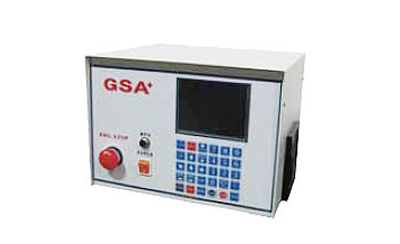
M-MATE II
- Features
- Specifications
- Download
- Use LED backlig ht 5.7- inch monitor
- Chinese/English subtit les, easy operation .
- Conneacting with M-Code of CNC M/C (Any Brand)
- Adopting AC servo systems to perform in high-precision, high speed, large torque
- To match any brand of servo motors such as: Yaskawa, Mitsubishi, Delta, TECO
- To offer 36 sets compensation for backlash adjusting, every 10 degrees compensation o nce to achieve t he best accuracy
- Optional HEIDENHAIN encoder to be closed-loop system
- Optional MPG hand wheel for workpiece adjusting
| ITEM | SPECIFICATION |
|---|---|
| Min. Increment | 0.001° |
| Programmable Angle | 0.000~999.999° |
| Emergency Stop | Whole system stop |
| Input Method | Keyboard input |
| Program Capacity | 15 sets of program |
| Program Step Capacity | 90 steps for each program |
| Homing | Machine homing/ relative homing |
| Jump Function | Jump to the subroutine (JUMP) |
| Cycle Loop | Step up to 999 times per cycle |
| Backlash Adjustment | Adjusted by parameter screen 1 of 2 |
| Standard Parameter Function | Input/Output interface, long press "." |
| Programmable System | Accepted incremental /absolute value |
| Instruction Selecting | Program input instruction/Indexing and rotating instruction |
| Origin Adjustment | Origin offset compensation setting |
| External Start Signal | Automatic operation by M-CODE |
| Delay Time | 0.1 to 99.9 seconds of delay |
| Input Power | Three-phase AC-220V 50/60HZ |
| Connection Cable | Power cable/Motor cable/CNC connection cables |
Program example (a circle drilling four holes, method of equal amount (90° degrees)) (program screen as shown below)
| Step 1. | Turn on the power | Step 5. | Input numeric key for setting speed |
|---|---|---|---|
| Step 2. | Press SCR key to enter the program edit screen | Step 6. | Input 4 of numeric keys to enter (division into four units) |
| Step 3. | Press 2 of numeric key to enter | Step 7. | Press the MODE key to return main screen |
| Step 4. | Input 360 (degrees) of numeric key to enter | Step 8. | Press START key for operation |
 |
Power switch |  |
Back to the execution screen |
 |
Emergency stop button |   |
Page key: switching program page |
 |
MPG (hand wheel) socket |   |
Jog key: select the direction for table rotating |
 |
Screen for info displayed |     |
Cursor key direction selecting |
 |
Stop key |  |
Switching key for system screen |
 ~ ~ |
Numeric keys: enter the program and parameters |  |
Selection key for program OP |
 |
l.To be decimal point while program setting or parameter status ll.Program code setting: press key 2 seconds while the program STEP1 of OP |
 |
Return to rela tive origin |
 |
"+" and "-" key: be the function while program setting or parameter status" |  |
Return to mechanical orig in |
 |
Insert a program while program setting |  |
Enter key |
 |
l.Long press 3 seconds for setting 0 degree of table while the execution status ll.Delete a program while program setting |
 |
Start key |
| 1.The angle of rotary table | 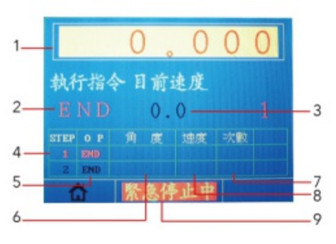 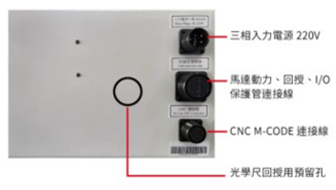 |
| 2.Executing instruction | |
| 3.The speed of rotary table Example | |
| 4.Display executing step | |
| 5.Program instrucations | |
| 6.Executing angle | |
| 7.The number of execution times | |
| 8.Executing speed | |
| 9.Current status |
 M-MATE II Single-Axis AC Servo Controller Specifications-PDF